
eero wifi system
eero LLCLifestyle
4.86.31K Reviews
- Version
- 26.13.0.36807
- Installs
- 5.00M
- Age Rating
- Everyone
Screenshots

Our Review of eero wifi system
 Analysis by Appyee
So, I’ve been diving into the world of home networking with the eero Wifi System, and honestly, it's like a breath of fresh air for anyone who's ever wrestled with dead zones or painfully slow connections. Let’s break down why this app is turning heads and making lives a little bit easier.
Setting Up: Easier Than You'd Think
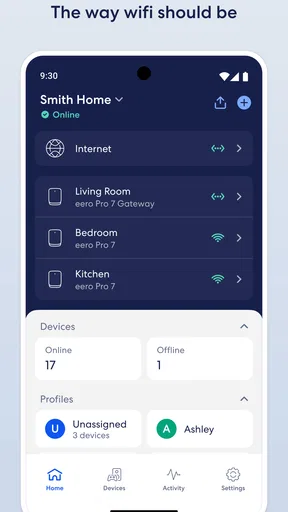
Right off the bat, the setup process for the eero Wifi System is super straightforward. You'd think it might be a tech headache, but nope! The app walks you through everything with step-by-step instructions that even your grandma could follow. All you need is a smartphone, the eero app, and a basic understanding of plugging things in. The app’s user interface is clean and intuitive—like having a tech-savvy friend guiding you along.
Features That Just Make Sense
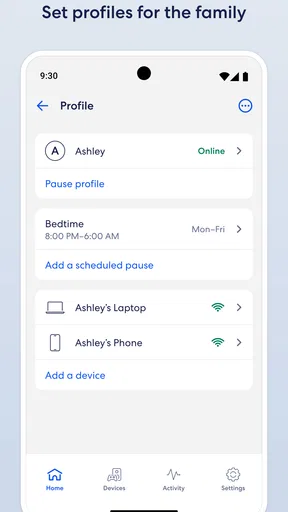
One of the standout features is the ease of managing your network. You can see all the devices connected to your network and even pause the internet on specific devices. Perfect if you need to cut off your teen's Fortnite session because dinner's ready. Plus, the app provides real-time data on internet usage, so you can keep tabs on who's hogging the bandwidth.
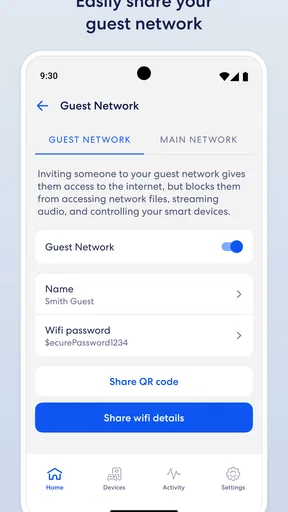
Another killer feature is the guest network option. Hosting a party or just want to keep your main network secure? Set up a guest network with just a few taps. It’s a lifesaver for maintaining security and privacy without compromising convenience.
Performance: Fast and Reliable
Let’s talk performance. The eero Wifi System delivers robust coverage throughout your home. Whether you’re streaming, gaming, or just doomscrolling on social media, the connection is consistently strong. I noticed a significant reduction in buffering, and the dreaded "spinning wheel of death" is now a rare sight.
Mesh networks like eero eliminate those pesky dead zones. So, if you’ve got a big house or thick walls, it’s a game-changer. The app allows you to add more eero devices if needed, ensuring seamless coverage as your needs grow.
Security: Peace of Mind
Security is a big deal with any home network, and the eero app doesn’t skimp on this front. It provides automatic security updates, which means you’re always protected against the latest threats without lifting a finger. Plus, with features like content filtering and ad blocking, you can keep your digital space safe and clutter-free. It’s like having a digital bouncer for your network.
Final Thoughts
All in all, the eero Wifi System app is a solid choice for anyone looking to upgrade their home network. It’s user-friendly, packed with useful features, and offers reliable performance. If you’re tired of frustrating connections and technical jargon, this app is your new best friend. Trust me; once you’ve experienced the ease and speed of eero, there’s no going back.
Ready to banish those dead zones and enjoy a smooth, fast internet experience? Check out the eero Wifi System and see for yourself why it’s making waves in the home networking space.
Privacy and Permissions
See what permissions an app requests and how it handles your data.
- Location
- approximate location (network-based), precise location (GPS and network-based)
- Photos/Media/Files
- read the contents of your USB storage, modify or delete the contents of your USB storage
- Storage
- read the contents of your USB storage, modify or delete the contents of your USB storage
- Camera
- take pictures and videos
- Wi-Fi connection information
- view Wi-Fi connections
- Other
- view network connections, pair with Bluetooth devices, access Bluetooth settings, connect and disconnect from Wi-Fi, full network access, run at startup, prevent device from sleeping
Verdict
Strengths of eero wifi system
- Easy setup with intuitive app interface.
- Seamless connectivity across multiple devices.
- Automatic updates enhance security.
- Compact design fits any space.
- Parental controls for safer browsing.
Limitations of eero wifi system
- Limited advanced configuration options.
- Requires subscription for some features.
- Dependence on internet for app control.
- May need multiple units for larger homes.
- Higher cost compared to basic routers.
Other Releases by eero LLC
View All
T-Mobile Fiber: eero
Personalization4.9
Similar Picks in This Category
View All
SmartThings
Samsung Electronics Co., Ltd.4.6

Google Home
Google LLC4.0

Pinterest4.2

Astrotalk - Talk to Astrologer
Astrology & Horoscope4.7

My Verizon
Verizon Consumer Group4.5

Samsung Wallet (Samsung Pay)
Samsung Electronics Co., Ltd.4.1
Frequently Asked Questions
What is the eero WiFi system and how does it work?
The eero WiFi system is a mesh network solution designed to provide seamless internet coverage throughout your home. It works by using multiple devices, called eeros, to create a network that blankets your space in strong WiFi. These devices communicate with each other, ensuring consistent speeds and reducing dead zones, unlike traditional routers.
Is the eero system compatible with my current internet provider?
Yes, the eero system is compatible with most internet service providers (ISPs). It connects directly to your existing modem. Whether you use cable, DSL, or fiber optics, eero should integrate seamlessly, allowing you to enjoy enhanced WiFi coverage without switching providers.
How difficult is it to set up the eero WiFi system?
Setting up the eero WiFi system is straightforward and user-friendly. You begin by downloading the eero app, which guides you through connecting your eero devices. The app offers step-by-step instructions, making it easy for even non-tech-savvy users to get their network up and running within minutes.
Can I manage my eero network remotely?
Yes, the eero app allows you to manage your network remotely. You can monitor device usage, check network status, and even pause internet access to specific devices from anywhere. This feature is particularly useful for parents looking to control their children's screen time effectively.
What security features does the eero system offer?
The eero system provides robust security features to protect your network. It includes automatic software updates, WPA3 encryption, and advanced threat protection. Additionally, with an eero Secure subscription, users can access features like ad blocking, content filtering, and activity insights to enhance security further.
